 button on the toolbar.
The
Page Editor offers you a possibility to view to the text you have
written in the editing area as HTML code. This is also where you would
need to access your page source code (for Advanced users only) or paste
any code provided to you by a trusted 3rd party. HTML knowledge is required
however since we do not provide support for custom codes. In order to
view the HTML code press button on the toolbar.
Example:

After pressing
 button, you can see the HTML code:
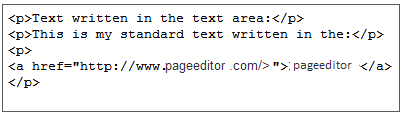
If you want
to go back to the normal text just press  again.
Editing the code in the HTML language is a very difficult feature and it should only be done by advanced users. If you don't have experience in HTML type the text normally.